
Notion vs Trello: Which Is the Best Productivity Tool in 2026?
Productivity tools have become essential for businesses, freelancers, startups, students, and remote teams.
Whether you’re managing projects, organizing tasks, planning content, building systems, or collaborating with teams, the right productivity platform can dramatically improve efficiency and workflow management.
Two of the most popular productivity tools in 2026 are Notion and Trello.
Both platforms help users stay organized, manage tasks, and collaborate with teams — but they work very differently.
- Notion focuses on flexibility, documentation, and all-in-one workspace management.
- Trello focuses on simplicity and visual task management using Kanban boards.
So which productivity tool is actually better?
The answer depends on:
- Your workflow style
- Team size
- Project complexity
- Collaboration needs
- Automation requirements
- Personal productivity preferences
In this guide, we’ll compare Notion vs Trello in detail and help you choose the right productivity tool for your needs in 2026.
What Is Notion?
Notion is an all-in-one workspace platform that combines:
- Notes
- Project management
- Databases
- Documentation
- Task management
- Team collaboration
into one flexible system.
Notion is especially popular among:
- Startups
- Remote teams
- Content creators
- Students
- Agencies
- Entrepreneurs
Its biggest strengths are:
- Flexibility
- Customization
- Workspace organization
- Documentation systems
What Is Trello?
Trello is a visual project management platform based on Kanban boards.
It helps users organize work using:
- Boards
- Lists
- Cards
- Checklists
- Workflow stages
Trello is especially popular among:
- Small teams
- Freelancers
- Beginners
- Creative teams
- Marketing teams
Its biggest strengths are:
- Simplicity
- Visual organization
- Fast onboarding
- Easy task tracking
Notion vs Trello: Quick Comparison
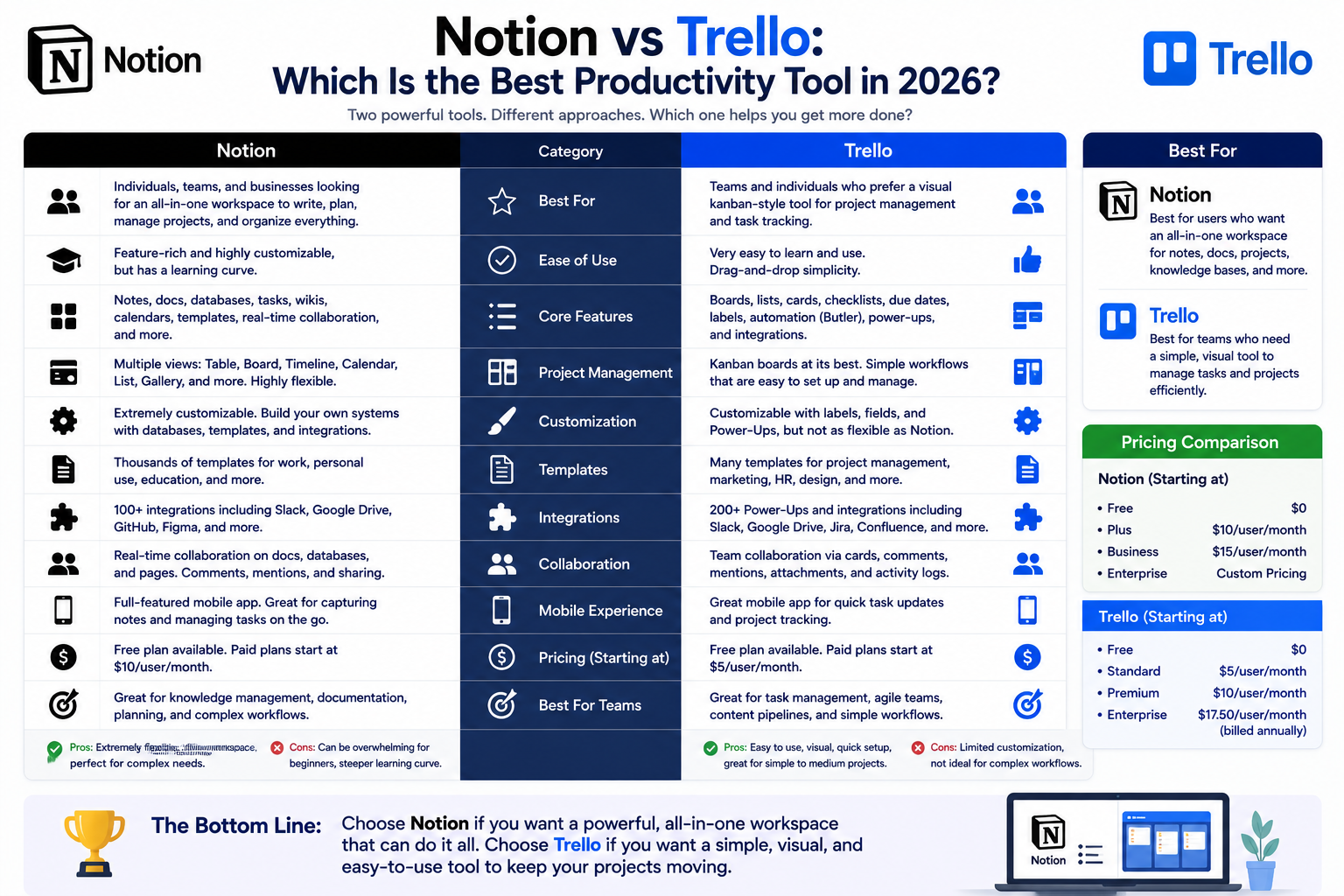
| Feature | Notion | Trello |
| Ease of Use | Moderate | Excellent |
| Customization | Excellent | Moderate |
| Project Management | Advanced | Simple |
| Documentation | Excellent | Limited |
| Collaboration | Strong | Strong |
| Visual Task Management | Good | Excellent |
| Databases | Advanced | Basic |
| Automation | Growing rapidly | Strong |
| Best For | Complex workflows | Simple task management |
1. Ease of Use
Trello
Trello is one of the easiest productivity tools available.
Its drag-and-drop Kanban board system is intuitive and beginner-friendly.
Why Users Love Trello
- Minimal learning curve
- Fast setup
- Visual task tracking
- Clean interface
Most users can start organizing projects within minutes.
Notion
Notion is more flexible but also more complex.
Because users can build:
- Databases
- Dashboards
- Wikis
- Custom systems
- Advanced workflows
The platform takes more time to learn fully.
Winner for Ease of Use:
✅ Trello
2. Flexibility and Customization
This is where Notion becomes extremely powerful.
Notion Customization
Notion allows users to create:
- Custom workspaces
- Content calendars
- Company wikis
- CRM systems
- Knowledge bases
- Project dashboards
The platform feels almost like building your own operating system for work.
Best For
- Advanced workflows
- Multi-purpose systems
- Business organization
- Team documentation
Trello Customization
Trello focuses more on simplicity than deep customization.
You can customize:
- Boards
- Labels
- Automations
- Workflows
But it’s less flexible overall compared to Notion.
Winner for Customization:
✅ Notion
3. Project Management Features
Trello Project Management
Trello excels at simple and visual project management.
Its Kanban boards help users:
- Track progress
- Organize workflows
- Manage tasks visually
- Collaborate easily
Best For
- Marketing teams
- Freelancers
- Simple workflows
- Agile task management
Notion Project Management
Notion supports more advanced project management structures.
Features include:
- Databases
- Timeline views
- Content calendars
- Linked tasks
- Advanced documentation
However, setup requires more effort initially.
Winner for Simple Project Management:
✅ Trello
Winner for Advanced Workflow Systems:
✅ Notion
4. Documentation and Knowledge Management
Notion Documentation
This is one of Notion’s strongest areas.
Businesses use Notion for:
- SOPs
- Team wikis
- Internal documentation
- Meeting notes
- Knowledge bases
Everything stays centralized in one workspace.
Trello Documentation
Trello supports notes within cards, but it isn’t built for large documentation systems.
Winner for Documentation:
✅ Notion
5. Collaboration Features
Both tools support strong collaboration.
Notion Collaboration
Notion allows teams to:
- Edit pages together
- Comment on documents
- Share databases
- Organize company knowledge
It works especially well for remote teams.
Trello Collaboration
Trello simplifies team collaboration through:
- Shared boards
- Assignments
- Due dates
- Notifications
- Workflow visibility
Winner for Collaboration:
✅ Tie
Depends on workflow style.
6. Visual Workflow Management
Trello Visual Workflows
Visual organization is Trello’s biggest strength.
The Kanban system makes it easy to:
- Track tasks
- Move projects
- Understand workflow stages instantly
Notion Visual Workflows
Notion supports Kanban boards too, but visual workflows feel slightly less intuitive than Trello’s dedicated system.
Winner for Visual Task Management:
✅ Trello
7. Databases and Advanced Systems
Notion Databases
Notion databases are extremely powerful.
Users can create:
- CRM systems
- Editorial calendars
- Project trackers
- Client management systems
- Business dashboards
This makes Notion far more scalable for advanced productivity systems.
Trello Databases
Trello is more task-focused and lacks advanced database functionality.
Winner for Databases:
✅ Notion
8. Automation Features
Automation is becoming increasingly important in productivity workflows.
Trello Automation
Trello includes Butler automation for:
- Task movement
- Notifications
- Workflow automation
- Repetitive actions
Its automation system is beginner-friendly and practical.
Notion Automation
Notion automation has improved significantly, especially through integrations and AI-powered features.
However, advanced automations may still require external tools like:
- Zapier
- Make
Winner for Native Simplicity:
✅ Trello
9. AI Features in 2026
Both platforms now include AI functionality.
Notion AI
Notion AI helps users:
- Generate content
- Summarize notes
- Brainstorm ideas
- Organize information
- Improve productivity workflows
AI integration feels deeply embedded in the workspace.
Trello AI
Trello AI focuses more on:
- Task organization
- Workflow suggestions
- Productivity assistance
Winner for AI Features:
✅ Notion
10. Pricing Comparison
Trello Pricing
Trello offers:
- Strong free plan
- Affordable upgrades
- Simpler pricing
Excellent for smaller teams and individuals.
Notion Pricing
Notion also offers generous free plans but advanced team features can become more expensive depending on workspace complexity.
Winner for Budget Simplicity:
✅ Trello
Best Tool by Use Case
Best for Beginners
Trello
Best for Complex Workflows
Notion
Best for Documentation
Notion
Best for Visual Project Management
Trello
Best for Startups and Teams
Notion
Best for Simple Task Tracking
Trello
Pros and Cons Summary
Notion Pros
- Extremely flexible
- Powerful databases
- Excellent documentation tools
- Strong AI features
- Great for complex systems
Notion Cons
- Steeper learning curve
- Can feel overwhelming initially
- Requires setup time
Trello Pros
- Very beginner-friendly
- Excellent visual workflows
- Fast setup
- Clean interface
- Great for simple task management
Trello Cons
- Limited advanced functionality
- Less scalable for complex systems
- Weaker documentation tools
Which Productivity Tool Should You Choose?
Choose Notion If:
- You want an all-in-one workspace
- You need documentation systems
- You manage complex workflows
- You want databases and dashboards
- You run a startup or remote team
- You prefer highly customizable systems
Choose Trello If:
- You want simplicity
- You prefer visual task management
- You’re a beginner
- You need fast project organization
- You manage straightforward workflows
- You like Kanban boards
Final Verdict
Both Notion and Trello are excellent productivity tools in 2026.
The better platform depends entirely on how you work.
- Notion is stronger for advanced systems, documentation, knowledge management, and flexible business workflows.
- Trello is better for simple, visual, beginner-friendly project and task management.
For startups, creators, agencies, and teams needing scalable organization systems, Notion usually offers more long-term flexibility.
For individuals and teams wanting fast, visual productivity without complexity, Trello often provides the smoother experience.
The most important thing is choosing the productivity system that helps you stay consistent, organized, and efficient over time.