
QuickBooks vs FreshBooks: Which One Should You Choose in 2026?
Choosing the right accounting software is one of the most important decisions for freelancers, startups, and small business owners.
The right platform can help businesses:
- Manage invoices
- Track expenses
- Monitor cash flow
- Simplify taxes
- Automate bookkeeping
- Improve financial organization
Two of the most popular accounting platforms in 2026 are QuickBooks and FreshBooks.
Both platforms offer excellent accounting and invoicing features, but they target slightly different types of users.
QuickBooks is known for its advanced accounting capabilities and scalability, while FreshBooks focuses heavily on simplicity, invoicing, and freelancer-friendly financial management.
So which one should you actually choose?
The answer depends on:
- Your business size
- Financial complexity
- Budget
- Accounting needs
- Team structure
- Growth plans
In this guide, we’ll compare QuickBooks vs FreshBooks in detail and help you decide which software is best for your business in 2026.
What Is QuickBooks?
QuickBooks is one of the most widely used accounting platforms in the world.
It provides:
- Full accounting systems
- Payroll management
- Tax preparation
- Expense tracking
- Invoicing
- Financial reporting
- Inventory management
QuickBooks is especially popular among:
- Small businesses
- Ecommerce companies
- Growing startups
- Accounting professionals
Its biggest strengths are:
- Advanced accounting features
- Scalability
- Financial reporting
- Extensive integrations
What Is FreshBooks?
FreshBooks is an accounting and invoicing platform designed primarily for freelancers and service-based businesses.
It focuses heavily on:
- Simplicity
- Professional invoicing
- Expense tracking
- Client management
- Time tracking
FreshBooks is especially popular among:
- Freelancers
- Consultants
- Designers
- Agencies
- Solopreneurs
Its biggest strength is making financial management easy for non-accountants.
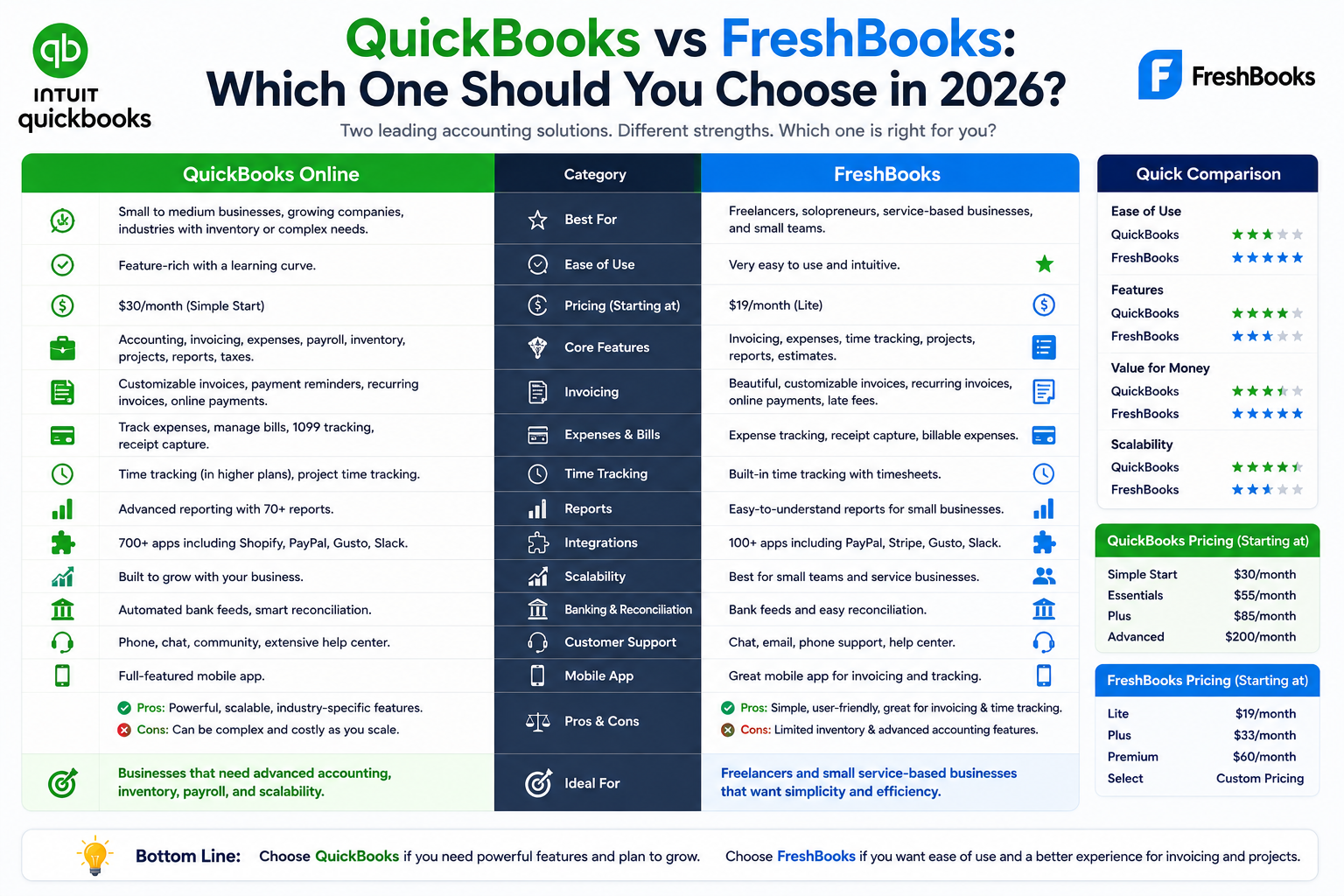
QuickBooks vs FreshBooks: Quick Comparison
| Feature | QuickBooks | FreshBooks |
| Ease of Use | Moderate | Excellent |
| Accounting Features | Advanced | Moderate |
| Invoicing | Strong | Excellent |
| Expense Tracking | Excellent | Very good |
| Payroll | Built-in options | Limited |
| Time Tracking | Available | Excellent |
| Inventory Management | Strong | Basic |
| Reporting | Advanced | Simpler |
| Best For | Growing businesses | Freelancers & service businesses |
1. Ease of Use
FreshBooks
FreshBooks is widely known for its clean and beginner-friendly interface.
The dashboard feels:
- Simple
- Modern
- Easy to navigate
- Non-technical
Most freelancers and small service businesses can start using FreshBooks quickly without accounting experience.
Why Users Love FreshBooks
- Minimal learning curve
- Easy invoice creation
- Simple expense management
- Intuitive navigation
QuickBooks
QuickBooks is more feature-rich, which also makes it slightly more complex.
Because it includes:
- Advanced accounting
- Payroll
- Tax tools
- Inventory management
- Reporting systems
new users sometimes need more time to learn the platform.
Winner for Ease of Use:
✅ FreshBooks
2. Invoicing Features
Invoicing is one of the biggest differences between these platforms.
FreshBooks Invoicing
FreshBooks excels at invoicing.
Features Include
- Professional invoice templates
- Recurring invoices
- Payment reminders
- Client portals
- Time-based billing
- Online payments
FreshBooks was built heavily around freelancer invoicing workflows.
Best For
- Service businesses
- Freelancers
- Agencies
- Consultants
QuickBooks Invoicing
QuickBooks also offers strong invoicing features but focuses more broadly on accounting overall.
Features Include
- Invoice creation
- Payment tracking
- Online payments
- Estimates
- Expense categorization
Winner for Invoicing:
✅ FreshBooks
3. Accounting Features
This is where QuickBooks becomes much stronger.
QuickBooks Accounting
QuickBooks provides:
- Double-entry accounting
- Tax preparation
- Financial forecasting
- Advanced reporting
- Inventory tracking
- Payroll systems
- Profit and loss analysis
It’s designed for businesses needing full financial management.
FreshBooks Accounting
FreshBooks covers essential accounting needs but is less advanced overall.
It works well for:
- Simple bookkeeping
- Client billing
- Expense tracking
- Freelancer finances
Winner for Accounting:
✅ QuickBooks
4. Expense Tracking
Both platforms offer strong expense management.
QuickBooks Expense Tracking
QuickBooks includes:
- Bank synchronization
- Receipt capture
- Automatic categorization
- Advanced financial reporting
Its expense management is especially useful for businesses with complex operations.
FreshBooks Expense Tracking
FreshBooks simplifies:
- Receipt uploads
- Expense categorization
- Client-related expenses
- Tax preparation
Winner for Expense Tracking:
✅ Slight Edge: QuickBooks
5. Time Tracking
FreshBooks Time Tracking
FreshBooks is especially strong for businesses billing clients hourly.
Features Include
- Built-in time tracking
- Billable hours
- Project tracking
- Automatic invoice conversion
This makes it extremely useful for freelancers and agencies.
QuickBooks Time Tracking
QuickBooks supports time tracking but often requires additional setup or integrations depending on the plan.
Winner for Time Tracking:
✅ FreshBooks
6. Payroll Features
QuickBooks Payroll
QuickBooks offers integrated payroll systems.
Features Include
- Salary processing
- Tax filing
- Employee payments
- Payroll reports
- Direct deposits
This makes QuickBooks much more scalable for growing teams.
FreshBooks Payroll
FreshBooks supports payroll through integrations rather than native advanced payroll systems.
Winner for Payroll:
✅ QuickBooks
7. Reporting and Analytics
QuickBooks Reporting
QuickBooks provides advanced financial reporting including:
- Profit and loss statements
- Cash flow reports
- Tax summaries
- Business forecasting
This helps businesses make deeper financial decisions.
FreshBooks Reporting
FreshBooks focuses more on simpler financial insights.
Reports are easier to understand but less detailed overall.
Winner for Reporting:
✅ QuickBooks
8. Pricing Comparison
Pricing depends on features and business complexity.
FreshBooks Pricing
FreshBooks pricing is generally:
- Simpler
- Freelancer-friendly
- Easier for small service businesses
It’s ideal for users needing essential financial management without enterprise-level features.
QuickBooks Pricing
QuickBooks can become more expensive, especially when adding:
- Payroll
- Advanced reporting
- Multiple users
- Inventory tools
However, the additional functionality often justifies the cost for growing businesses.
Winner for Budget-Friendly Simplicity:
✅ FreshBooks
9. Scalability
QuickBooks Scalability
QuickBooks scales extremely well for:
- Growing businesses
- E-commerce companies
- Multi-employee operations
- Financially complex businesses
FreshBooks Scalability
FreshBooks works best for:
- Freelancers
- Agencies
- Smaller service businesses
As operational complexity increases, some businesses eventually outgrow FreshBooks.
Winner for Scalability:
✅ QuickBooks
Best Software by Business Type
Best for Freelancers
FreshBooks
Best for Small Businesses
QuickBooks
Best for Invoicing
FreshBooks
Best for Full Accounting
QuickBooks
Best for Agencies and Consultants
FreshBooks
Best for Growing Teams
QuickBooks
Pros and Cons Summary
QuickBooks Pros
- Advanced accounting features
- Strong reporting tools
- Payroll integration
- Inventory management
- Highly scalable
QuickBooks Cons
- Slightly steeper learning curve
- More expensive
- Can feel overwhelming for beginners
FreshBooks Pros
- Extremely user-friendly
- Excellent invoicing
- Great for freelancers
- Built-in time tracking
- Simple financial management
FreshBooks Cons
- Limited advanced accounting
- Less scalable for complex businesses
- Weaker inventory management
Which One Should You Choose?
Choose QuickBooks If:
- You run a growing business
- You need advanced accounting
- You manage inventory
- You need payroll systems
- You want deeper financial reporting
- Your business operations are becoming more complex
Choose FreshBooks If:
- You’re a freelancer or consultant
- You prioritize invoicing
- You bill clients hourly
- You want simplicity
- You prefer beginner-friendly software
- You run a service-based business
Final Verdict
Both QuickBooks and FreshBooks are excellent accounting platforms in 2026.
The better choice depends entirely on your business needs.
- QuickBooks is stronger for advanced accounting, payroll, reporting, and scalable business operations.
- FreshBooks is better for freelancers, consultants, agencies, and businesses prioritizing invoicing simplicity.
For growing businesses needing complete financial systems, QuickBooks usually provides more long-term flexibility.
For service-based businesses wanting easy invoicing and simple accounting, FreshBooks often delivers the smoother experience.
The most important thing is choosing software that matches your workflow, financial complexity, and future business growth plans.